01 工作表
按选择的名单对工作表批量隐藏或取消隐藏
用Excel_VBA,按指定的名单,可以批量隐藏或取消隐藏指定的工作表。
它的整个运行过程的逻辑也很简单,用工作表的方法:
- Sheets(X).Visible = xlSheetVisible 显示
- Sheets(X).Visible = xlSheetHidden 隐藏
即可实现 。
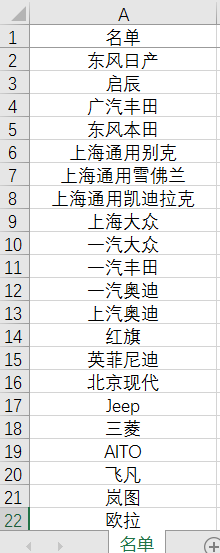
如图所示,按照工作表的名单,在当前工作簿中批量隐藏/取消隐藏工作表:
运行视频:
源码下载:
描述:
根据指定名单批量隐藏(取消隐藏)工作表
VBA实现过程:
- 1.On Error Resume Next,因为有错误发生时的预处理,添加它是为了保证程序发生错误不中断;
- 2.双层循环,遍历选中的单元格和工作表;
- 3..Visible = xlSheetVisible 显示
- 4..Visible = xlSheetHidden 隐藏;
- 5.两段代码关键的不同,在'------------的夹行中。
示例代码(批量隐藏)
复制成功!
1
Sub 工作表批量隐藏()

    Dim Name_list, rng As Range
    Dim Str_name, Act_name As String
    Dim sht As Worksheet

    On Error Resume Next                                '在错误发生时,仍可以继续运行
    Set Name_list = Application.InputBox(选择工作表名单, 提示_, Type=8)          '选择工作表名单
    If Err.Number  0 Then MsgBox 未选择内容 Exit Sub                              '未选择时退出
    If WorksheetFunction.CountA(Name_list) = 0 Then MsgBox 选择的内容为空 Exit Sub '选择的单元格区域内容都是空时也退出

    Act_name = Name_list.Parent.Name                   '获取选择的单元格区域所在的工作表名,最后要激活它

    For Each rng In Name_list                           '遍历名单
        Str_name = rng.Value                            '单元格内容赋值作为工作表名称
        For Each sht In Sheets
            If Str_name = sht.Name And sht.Name  Act_name Then  '隐藏符合条件的单元格
               sht.Visible = xlSheetHidden
            End If
        Next sht

    Next rng
    Sheets(Act_name).Activate                            '激活名单所在在工作表


    MsgBox 完成

End Sub
示例代码(批量显示)
复制成功!
1
Sub 工作表批量取消隐藏()

    Dim Name_list, rng As Range
    Dim Str_name, Act_name As String
    Dim sht As Worksheet

    On Error Resume Next                                '在错误发生时,仍可以继续运行
    Set Name_list = Application.InputBox("选择工作表名单", "提示_", Type:=8)          '选择工作表名单
    If Err.Number > 0 Then MsgBox "未选择内容": Exit Sub                              '未选择时退出
    If WorksheetFunction.CountA(Name_list) = 0 Then MsgBox "选择的内容为空": Exit Sub '选择的单元格区域内容都是空时也退出

    Act_name = Name_list.Parent.Name                   '获取选择的单元格区域所在的工作表名,最后要激活它

    For Each rng In Name_list                           '遍历名单
        Str_name = rng.Value                            '单元格内容赋值作为工作表名称
        For Each sht In Sheets
'-----------------------------------------
            If Str_name = sht.Name Then
               sht.Visible = xlSheetVisible             '显示符合条件的单元格
'-----------------------------------------
            End If
        Next sht

    Next rng
    Sheets(Act_name).Activate                            '激活名单所在在工作表


    MsgBox "完成"

End Sub
 请开发者喝杯咖啡!